Reconditioning software for independent used‑car dealerships
Stop chasing recon updates
Every vehicle's recon stages on one shared board, updated from the phone or computer by whoever does the work. See what's done, what's blocked and why, and what's next, without walking the shop to ask.

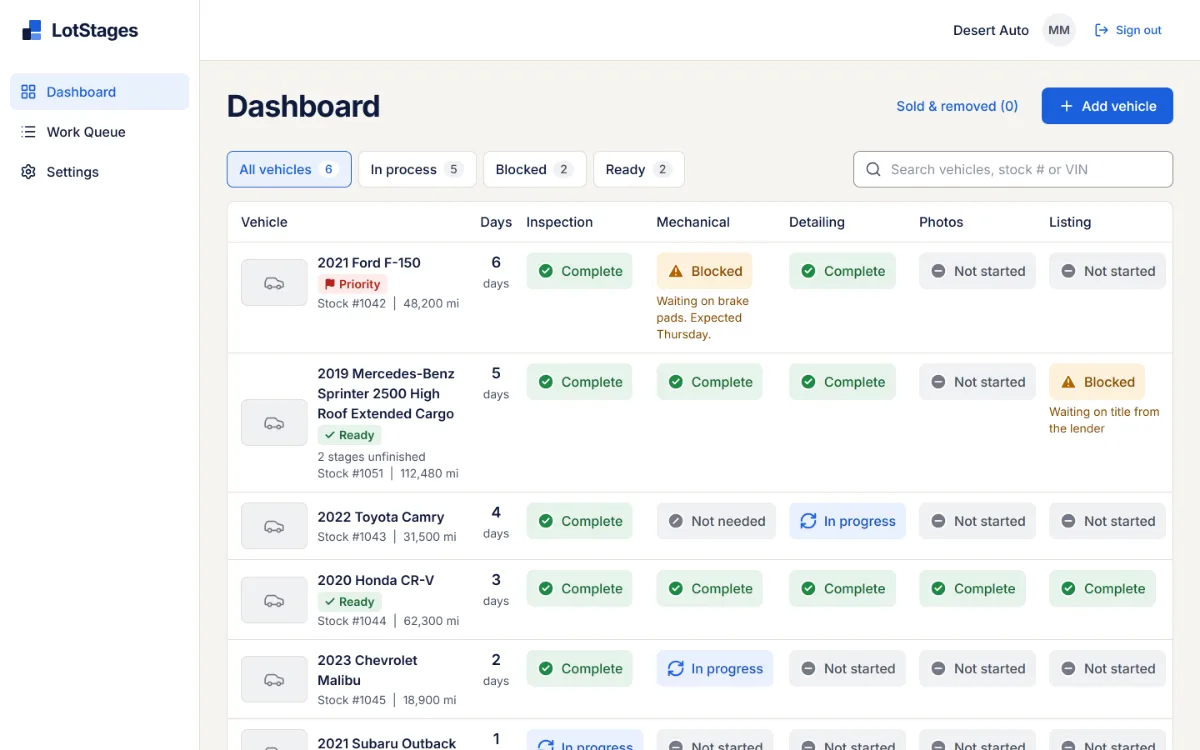
- A blocker, with its reason. Mechanical is blocked: "Waiting on brake pads. Expected Thursday." Anyone checking on the truck sees why it's waiting and when it should move again.
- Work that keeps moving. Detailing finished while Mechanical waits for parts. Stages aren't locked into a sequence, so one hold-up doesn't stop everything else.
Real LotStages screens with a fictional dealership's sample data.
Early access. We're looking for a few independent dealerships to pilot LotStages, and we set up each one personally. Pricing is on request.
And the next action, right where the work is

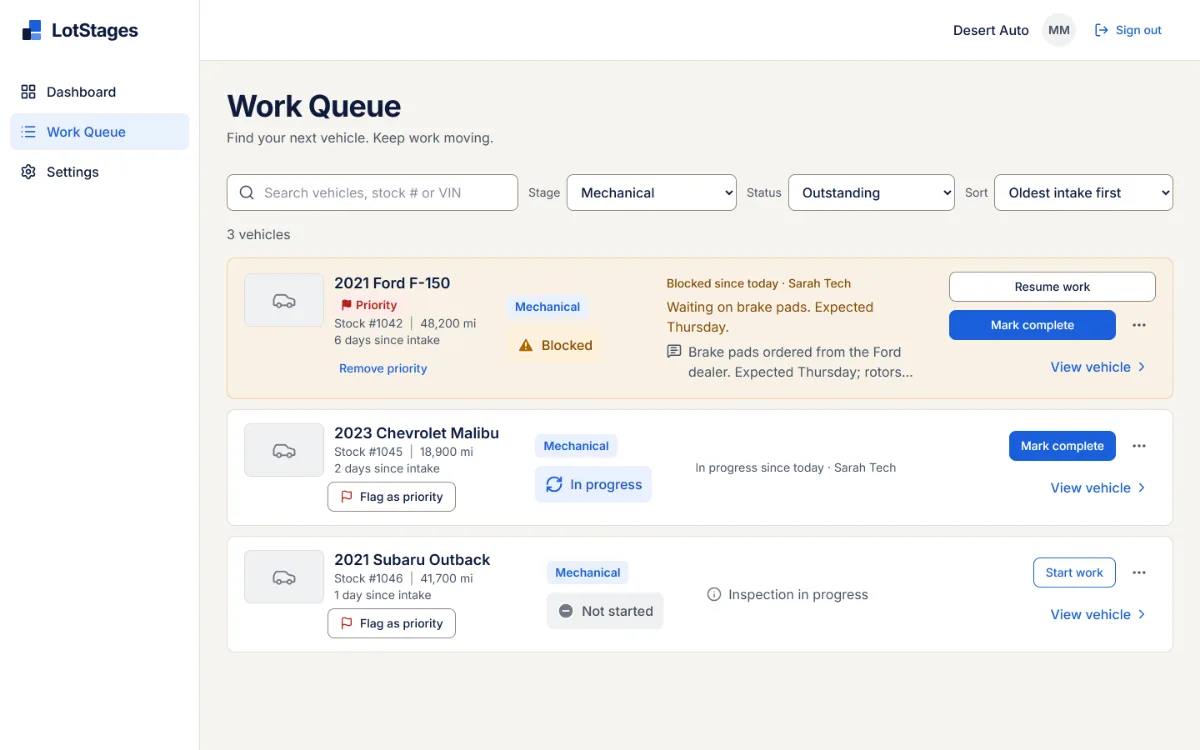
- The next action, right there. In the Work Queue, the technician resumes the stage when the pads arrive, then marks it complete, from the entry itself.
Picture this with your own cars and stages
In a demo we walk through LotStages with sample data, then talk through how recon runs at your store: your stages, who does what, and where cars wait.
"Is the F-150 ready yet?"
Answer "where's that car?" from your desk
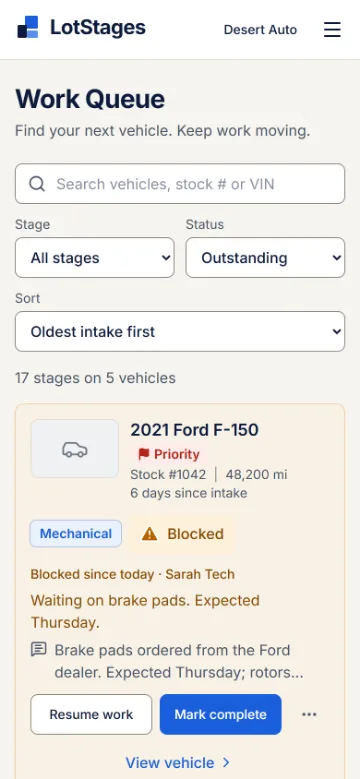
The Dashboard shows every vehicle in recon, with every stage side by side, its days since intake and any blocker's reason. Filter to Blocked or Ready, or search by stock number or VIN, full or just the last six.
A car with three things going on never looks like it's in just one place.
"Why has that car been sitting all week?"
See what's stuck, and why
When a stage can't go any further, the person who hit the problem marks it blocked and says why: a part on order, an approval, a title from the lender. The reason shows on the Dashboard, on the vehicle, and on the car's other entries in the Work Queue, and the Blocked filter lists every stuck car in one place.
- Not started
- In progress
- Blocked
- Complete
- Not needed
Listing blocked · Waiting on title from the lender
Every status has a word and an icon as well as a color, so nothing depends on color alone.
"I finished that one. What's next?"
Give the shop a list of what's next
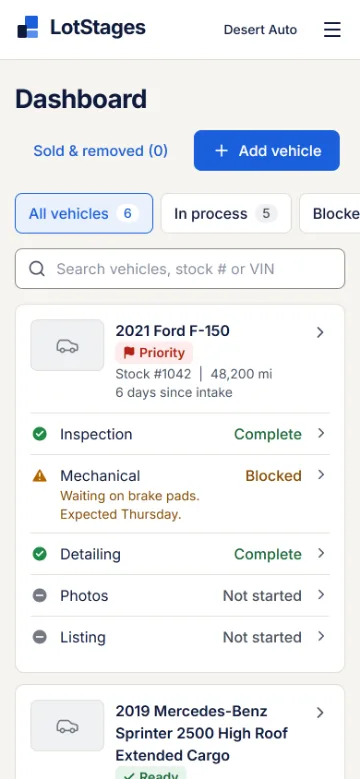
The Work Queue lists outstanding work stage by stage, oldest intake first, with priority cars at the top. A detailer filters to Detailing and works down the list; each entry has the action that moves it forward.
It's shared by default, so nobody has to assign every car. Turn assignments on when you want them.
"The board is only as current as the last person who walked past it."
Updates come from where the work happens
LotStages runs in the web browser on phones and computers. There's no app to install or keep updated, and each person signs in with their own account.
- A technician marks a stage complete from the bay, and a manager sees it on the next look at the Dashboard.
- Photos of a vehicle can be taken or uploaded from the phone.
- Notes can belong to a stage, so the detailer's note stays with Detailing.
Small problems that slow a recon line down
A customer is waiting on one car.
Flag it as priority. Its stages move to the top of the Work Queue for the whole team.
The car can be shown before every stage is done.
A manager marks it Ready for sale by hand. The unfinished stages stay on the board.
Not every car needs every stage.
Mark a stage Not needed. It's recorded as a decision, not as work done.
"Who changed that, and when?"
Every stage change, note, photo and correction is in the vehicle's history, with who made it and when.
Your process isn't the default one.
Rename, reorder, add or retire stages, and add your own vehicle fields.
Not everyone should change everything.
Admin, Manager, Employee and View only roles, and employees can be limited to the stages they work on.
Is LotStages a fit?
A good fit if
- you're an independent used-car dealership with a small reconditioning team;
- several people touch each car: inspection, mechanical, detail, photos;
- recon status lives on a whiteboard, a spreadsheet or in people's heads;
- you want everyone to see the same status without assigning every car.
Good to know
- LotStages doesn't connect to a DMS or inventory feed. Vehicles are added in LotStages; the year, make and model are enough to start.
- It doesn't include turnaround or time-to-line reports. Each vehicle shows its days since intake, and its history records when every stage changed.
- It tracks reconditioning, not sales, financing, parts ordering or accounting.
More questions? See the product FAQ, or read our guide to tracking recon, with a table you can copy.
See it with sample data, then talk through your stages
We'll show LotStages with a fictional dealership and ask how recon runs at yours.