Product
How LotStages works
A walkthrough of LotStages, screen by screen, and the recon problem each part helps with. Every screenshot is the real product, showing a fictional dealership's sample data.
"Where is that car, and what's left?"
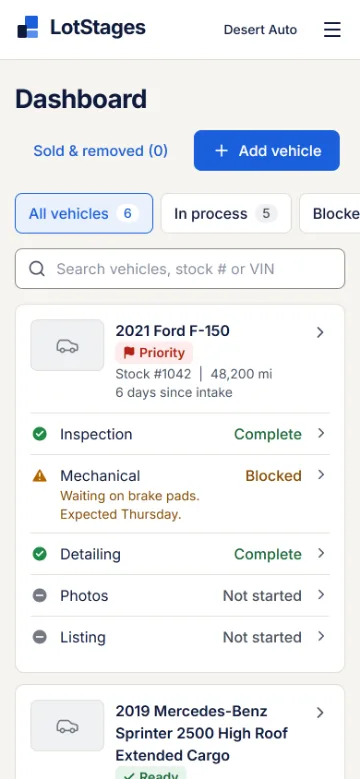
Dashboard: where every car stands
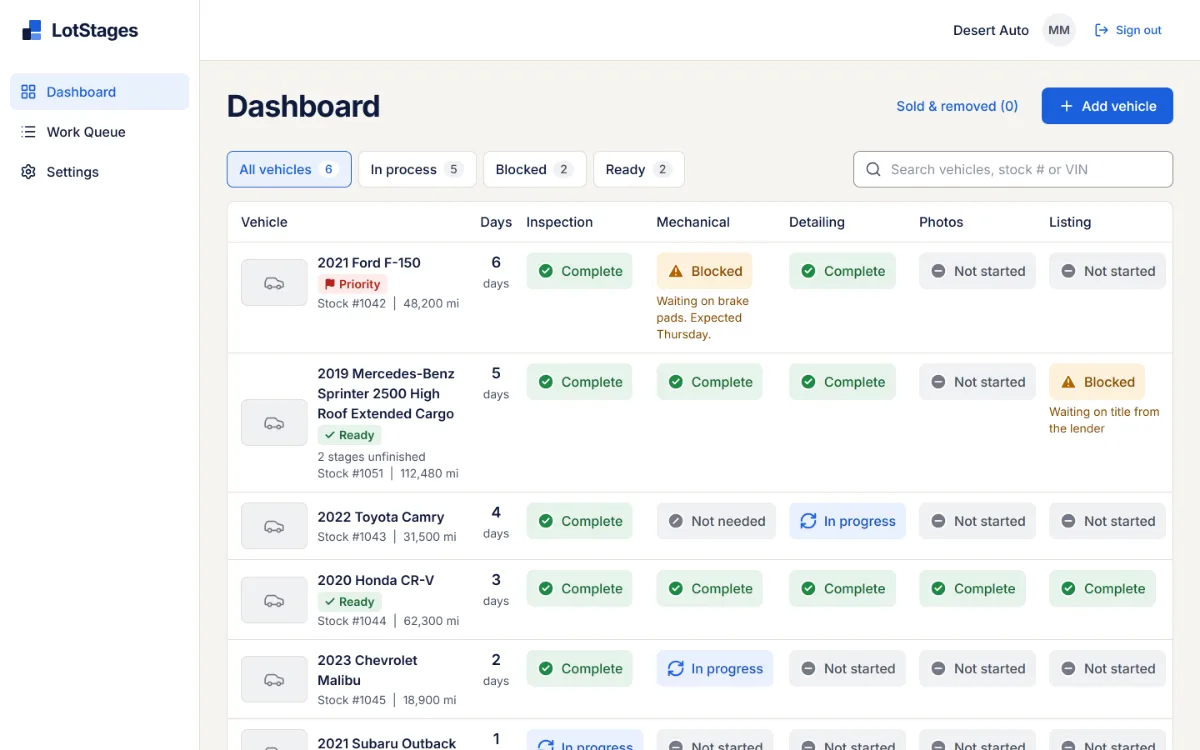
The manager's view of the whole recon line, for the question sales and managers ask all day. One row per vehicle, with every stage side by side, so a car with three things going on never looks like it's in just one place.
- Each row shows the vehicle, its stock number and mileage, days since intake, and the status of every stage.
- A blocked stage shows its reason right in the row.
- Filter by All vehicles, In process, Blocked or Ready, and search by name, stock number, or full or partial VIN.
- Oldest intake comes first, so the cars that have waited longest are at the top.
- Every status is a link that opens the vehicle at that stage, with its notes.
"I finished that one. What's next?"
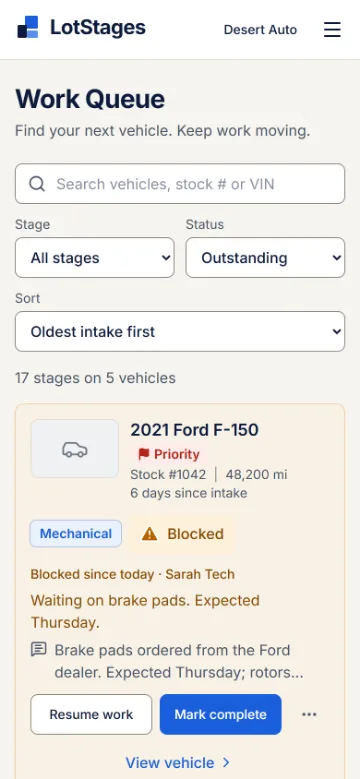
Work Queue: what to work on next
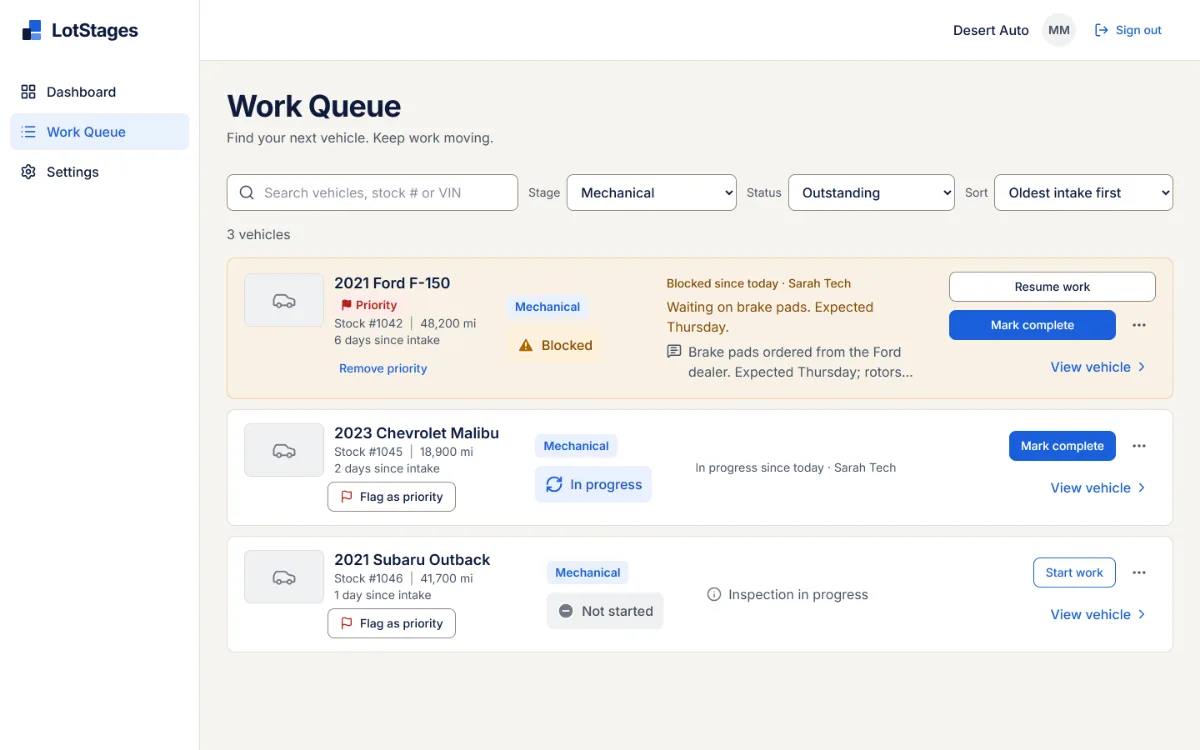
Where the team works, so nobody finishes a job and waits to be told the next one. Each entry is one stage of one vehicle, with the action that moves it forward.
- Filter by stage (for example, just Detailing) and status. Outstanding work is the default.
- Start work, Mark complete, Mark blocked and Resume work, each naming the stage it changes.
- When another stage of the same car is blocked, the entry says so, so nobody is surprised.
- Priority vehicles come first; otherwise oldest or newest intake, your choice.
- Optional assignments: filter by Assigned to me, Unassigned or a person. With assignments off, it's simply the shared list.
"What's been done to this car, and by whom?"
Vehicle page: everything about one car
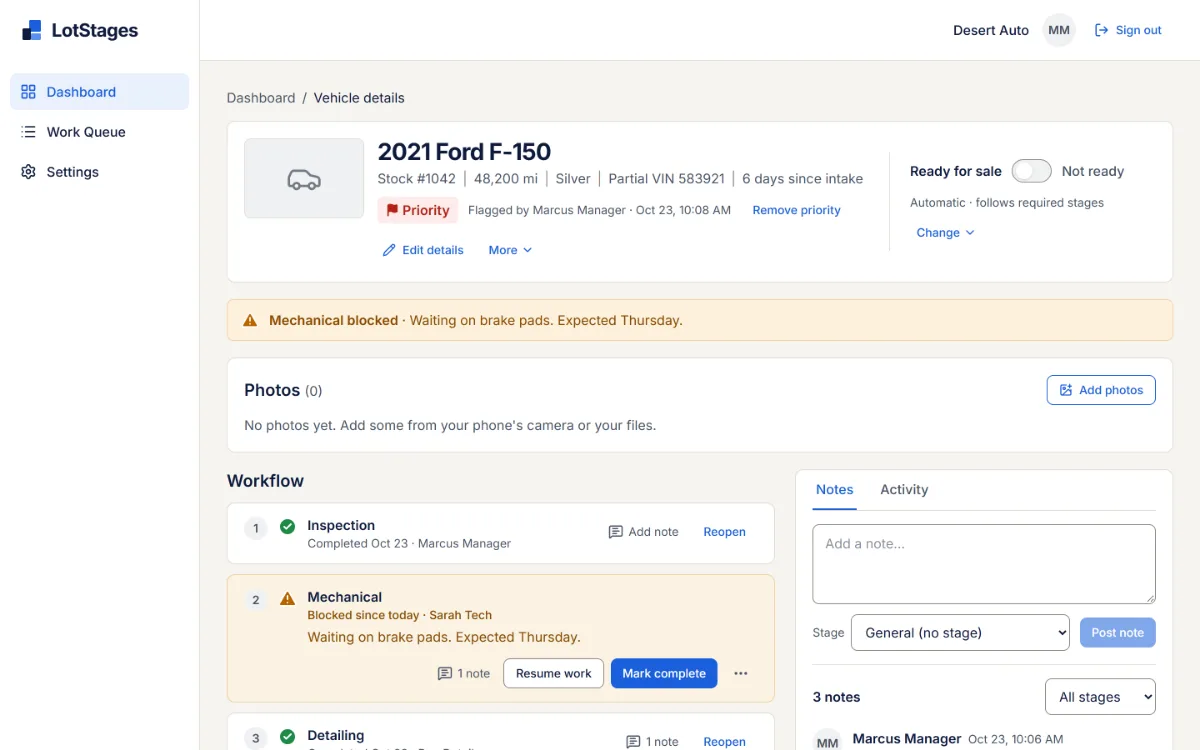
The whole story of a vehicle from intake to sale: what's done, who did it, what's left and why.
- Details: year, make, model, trim, stock number, mileage, color, intake notes, and a full VIN, a labeled partial VIN or none.
- Stages in your order, each with its status, who changed it and when, and its actions. Completed stages can be reopened.
- Ready for sale sits apart from the work: automatic from your required stages, or set by hand.
- Notes for the whole car or for one stage, and photos: up to 24 per vehicle, resized on the device before upload, with location data removed.
- Activity history of every change, separate from the notes.
"That's not how we do recon here."
Your setup, without a consultant
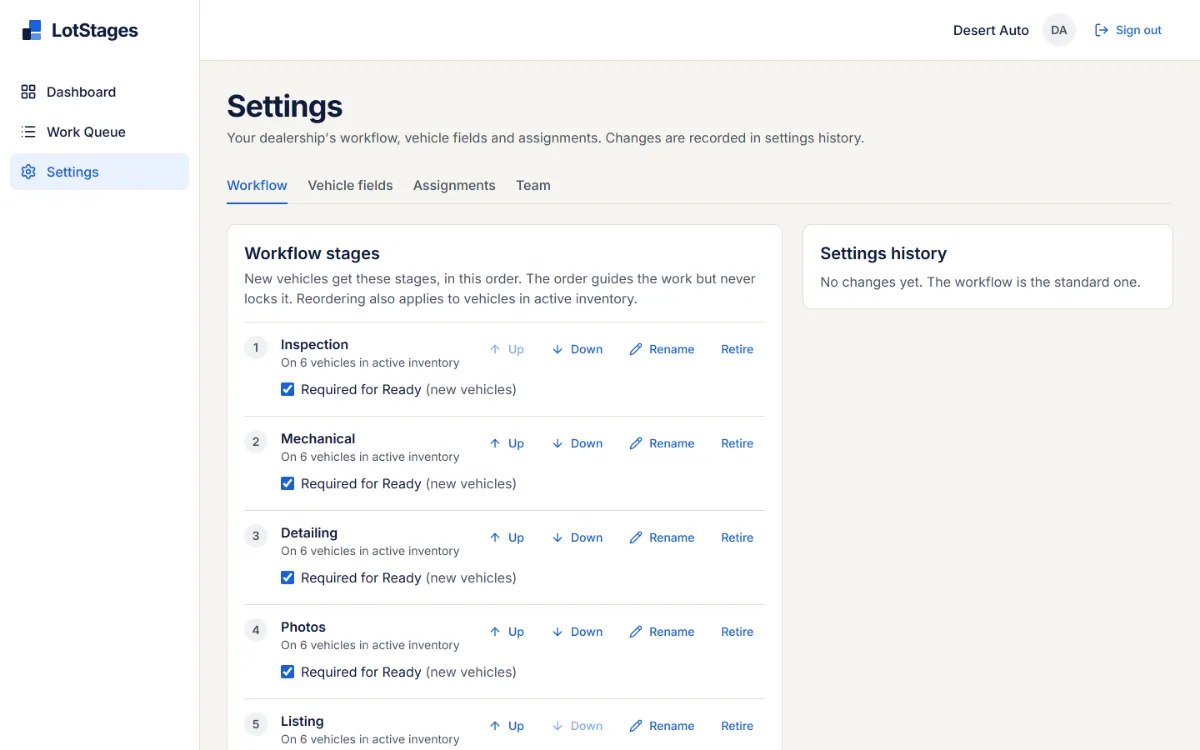
Every store runs recon a little differently, so an admin adjusts LotStages to how yours already works. Every settings change is recorded in settings history.
- Stages: rename, reorder, add (for example, a safety inspection) or retire them, and choose which ones are required for Ready.
- Vehicle fields: up to 10 extra details of your own, such as text, number, yes/no, date or a list of choices. They're always optional.
- Assignments: on or off for the whole dealership.
"Who updated this?"
Team and access
Updates come from the person doing the work, under their own name. Everyone has their own sign-in, and each person sees and does what their role allows.
Four roles
Admin, Manager, Employee and View only. Managers handle vehicles, readiness and assignments; employees update the stages they work on.
Stage access
Limit an employee to certain stages, such as Detailing and Photos, or give them all of them.
Invitations and passwords
Admins invite people by email. Each person sets their own password and can reset it if they forget it.
When someone leaves
Deactivate them and their access ends. Their name stays on the work they did.
Separate dealerships
Each dealership's vehicles, notes and photos are kept to itself. Someone who works at two stores switches between them.
"I'm in the bay, not at a desk."
In the web browser, on phones and computers
There's no app to install or keep updated: people sign in from the browser on a phone or a computer and get the same actions on both. Phone screens use cards and tabs instead of a squeezed table.
Vehicle photos can be taken with the phone's camera or picked from its library.
Questions
Who is LotStages for?
Independent used-car dealerships with a small reconditioning team, a few people across inspection, mechanical, detail and photos, who need everyone to see the same status without a meeting or a walk to the shop.
Do technicians need to install an app?
No. LotStages runs in the phone's web browser. Each person signs in with their own account.
Does it connect to my DMS or inventory system?
No. LotStages doesn't connect to a DMS or inventory feed. Vehicles are added in LotStages; the year, make and model are enough to start, and the rest can be filled in later.
Does it report time to line?
LotStages doesn't include a time-to-line or turnaround report. Each vehicle shows its days since intake, and its history records when every stage changed.
When do other people see an update?
Each update is stored when it's saved. Other people see it the next time they open the page, refresh it, or switch back to it on their phone or computer.
Do we have to assign every car to someone?
No. The Work Queue is shared by default. An admin can turn assignments on, and then managers assign stages only where it helps.
What if our process doesn't match the default stages?
Rename, reorder, add or retire stages in settings. Stages can also be worked out of order, and a stage that doesn't apply to a car can be marked Not needed.
What does it cost?
Pricing is on request while LotStages is in early access. Request a demo and we'll talk it through.
How do we get started?
Request a demo. If LotStages fits, we'll talk about a pilot: we set up your dealership and stages and invite your team. There's no self-serve signup.
Want to see it with your stages in mind?
Tell us how recon runs at your store, and we'll walk through LotStages with sample data.